CSV Viewer
Open or drop a CSV file and read it as a table: sort columns, search all cells, page through large files. Nothing is uploaded.
Next step
Need the table you just opened as a document someone else can read or print?
Paste CSV or open a file to get a PDF table with the header row repeated on every page; wide files can go landscape.
Convert this CSV to a PDF table →Popular tools
This CSV viewer opens a CSV file and shows it as a table with a row-number column, without Excel or any other program. Paste the text into the box, open a file from your computer, or drop a file onto the box, and the rows and columns appear right away.
The viewer runs entirely in your web browser. Your file is read and processed on your own device, nothing is uploaded, and you do not need an account or sign-up. It is free to use.
Use it as a csv file viewer when you want to check the contents of a spreadsheet export, scan a long list of records, or find one value without installing software. It also works as an online csv opener and a csv reader free of charge, and you can read a csv online in any modern browser.
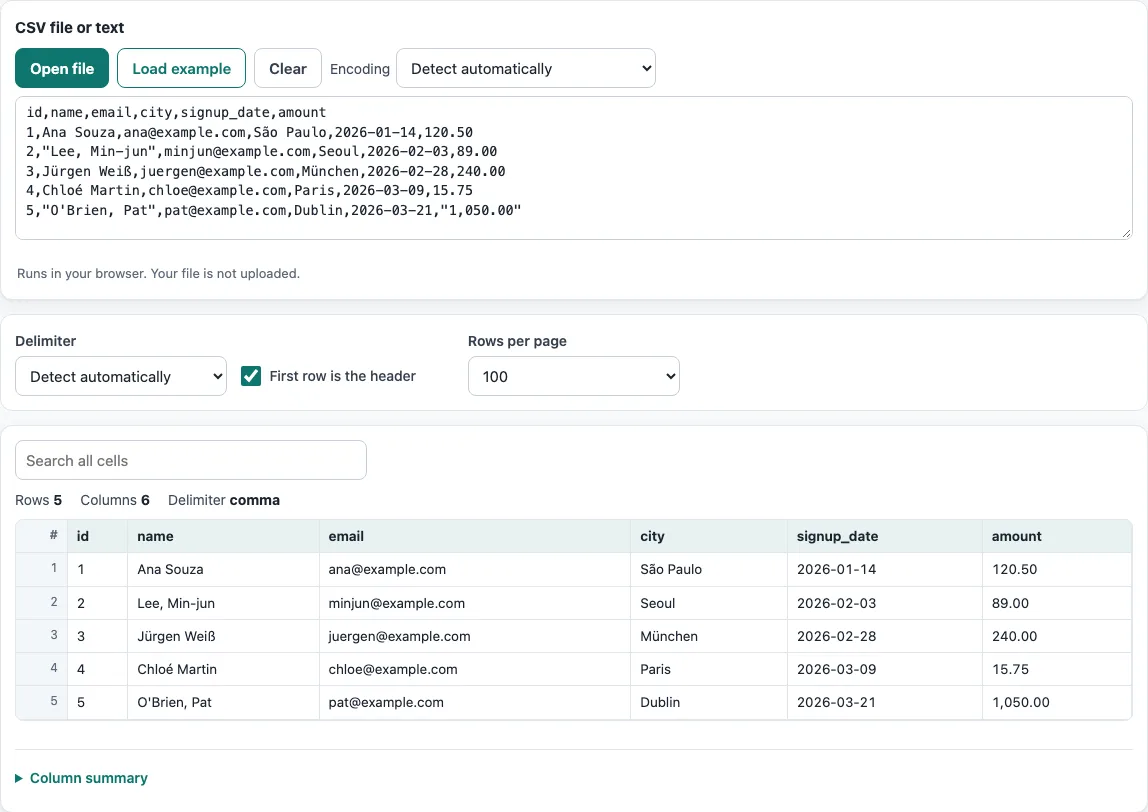
How to use the CSV viewer
- Load your data in one of three ways: paste text into the box, press Open file and choose a file, or drop a file onto the box. To try the tool first, press Load example. To empty the box, press Clear.
- Check the Delimiter menu. It is detected automatically (comma, semicolon, tab or pipe), but you can choose the separator yourself.
- Leave First row is the header on if the first line holds column names. Turn it off to name the columns Column 1, Column 2 and so on.
- If letters look wrong, change Encoding from Detect automatically to the encoding your file uses, such as UTF-8.
- Click a column header to sort ascending, click it again for descending, and a third time to return to file order.
- Type in Search all cells to show only rows that contain the text anywhere. The row numbers still show each row’s position in the file.
- For large files, set Rows per page to 50, 100, 500 or 1,000, then use Previous and Next to move through the pages.
The summary above the table shows the rows, columns, delimiter and encoding. Open Column summary below the table to see, for every column, how many cells are filled or empty, how many distinct values it has, whether it holds only numbers, and the smallest and largest number. Option choices stay in the page address; your data never does.
How can I open a CSV file?
Open it in this viewer: press Open file (or drop the file on the box) and it appears as a table straight away, with nothing to install. You can also open a CSV in Excel with Data > From Text/CSV, or in Google Sheets with File > Import, which both let you choose the delimiter.
A CSV file is a plain-text file in which each line is one record and the fields in each line are separated by a delimiter, usually a comma. Some regions and programs use a semicolon, a tab or a pipe instead. Because the file is only text, any program that understands the delimiter can display it as a table.
Fields may contain the delimiter itself. The usual rule, from RFC 4180, is that such a field is wrapped in double quotes, and a quote inside a quoted field is written as two double quotes (""). A field can also contain a line break when it is quoted. If a quote is never closed, or a quote appears inside an unquoted field, the file is malformed. This viewer reports how many such problems it found and the line of the first one.
Opening the file correctly depends on the delimiter. The viewer checks the first 50 records and picks the separator that splits them into the same number of columns most consistently. If the result looks like a single column, choose the delimiter manually.
How to view the encoding of CSV files?
Encoding is the rule that turns the bytes in a file into letters. The viewer shows the encoding it used above the table, and adds “+ BOM” when the file starts with a byte-order mark. Detection checks for a byte-order mark, then UTF-16, then valid UTF-8, and otherwise reads the file as Windows-1252.
Detection can be wrong, so you can set the Encoding menu yourself. Other choices include ISO-8859-2, Windows-1251, Shift_JIS, GBK, Big5 and EUC-KR. Pick the encoding that matches the language of the text. If accented letters appear as pairs such as “é”, the file is UTF-8 but was read as Windows-1252. Changing the setting to UTF-8 fixes the display in this viewer.
Frequently asked questions
How do you open large CSV files?
The viewer parses the whole file in your browser and shows one page of rows at a time. Files of several tens of megabytes work on a normal computer, with the browser’s memory as the limit. Set Rows per page to 1,000 and use Previous and Next to move through the file.
How do you open a CSV file in Excel with the columns split automatically?
Double-clicking a .csv file can put every value in one column when Excel’s regional list separator does not match the file’s delimiter. In Excel, choose Data > From Text/CSV, pick the delimiter in the dialog, and set the file origin to 65001 (Unicode UTF-8) if the text has accented letters.
Why is my CSV file showing weird characters?
Characters such as “é” instead of “é” mean a UTF-8 file was read as Windows-1252. Set Encoding to UTF-8 in this viewer, or convert the file with the CSV to UTF-8 tool.
Can I sort or search a CSV file here?
Yes. Click a column header to sort, and use Search all cells to filter rows by any text. Numbers sort as numbers, so 9 comes before 10, and empty cells always stay at the bottom.
Is my CSV file uploaded anywhere?
No. The file is read and processed by your browser on your own device, and nothing is uploaded. No account is needed.
Does the viewer change my file?
No. The viewer only reads the file and never writes to it. To change values, use the CSV editor.
How do I open a CSV format file that shows everything in one column?
The program used the wrong delimiter. Here, check the Delimiter menu and pick semicolon, tab or pipe; in Excel, use Data > From Text/CSV and choose the delimiter there. Files from countries that write decimals with a comma often use semicolons.
How do I open a CSV file in R?
Use read.csv("data.csv") for comma-separated files or read.csv2() for semicolon files with decimal commas; add fileEncoding = "UTF-8" if accents look wrong. To just look at the file first, open it in this viewer.
Related tools
- CSV editor: use it when you need to change cell values in a CSV file, not only view it.
- CSV to JSON: use it when another program needs your CSV data as JSON.
- XLSX to CSV: use it when your data is in an Excel workbook and you need plain CSV.
- Split CSV: use it when a file is too large and you want it in smaller parts.
- CSV validator: use it when you want to check a file for quoting and structure errors.
- CSV formatter: use it when you want to tidy the layout of a CSV file.
- CSV to UTF-8: use it when you want to convert a file’s encoding to UTF-8 permanently.
- CSV file format: use it when you want the rules behind the format in more detail.