CSV File Format, Explained With a Live Field Splitter
Type a few CSV lines or pick an example to see exactly how quotes, commas and line breaks decide where each field begins and ends.
CSV file format is a plain-text way to store a table, also called a comma-separated values file or comma delimited file. Each line holds one record, and the fields in that record are separated by commas. This page has a free CSV field splitter that shows how CSV text breaks into records and fields.
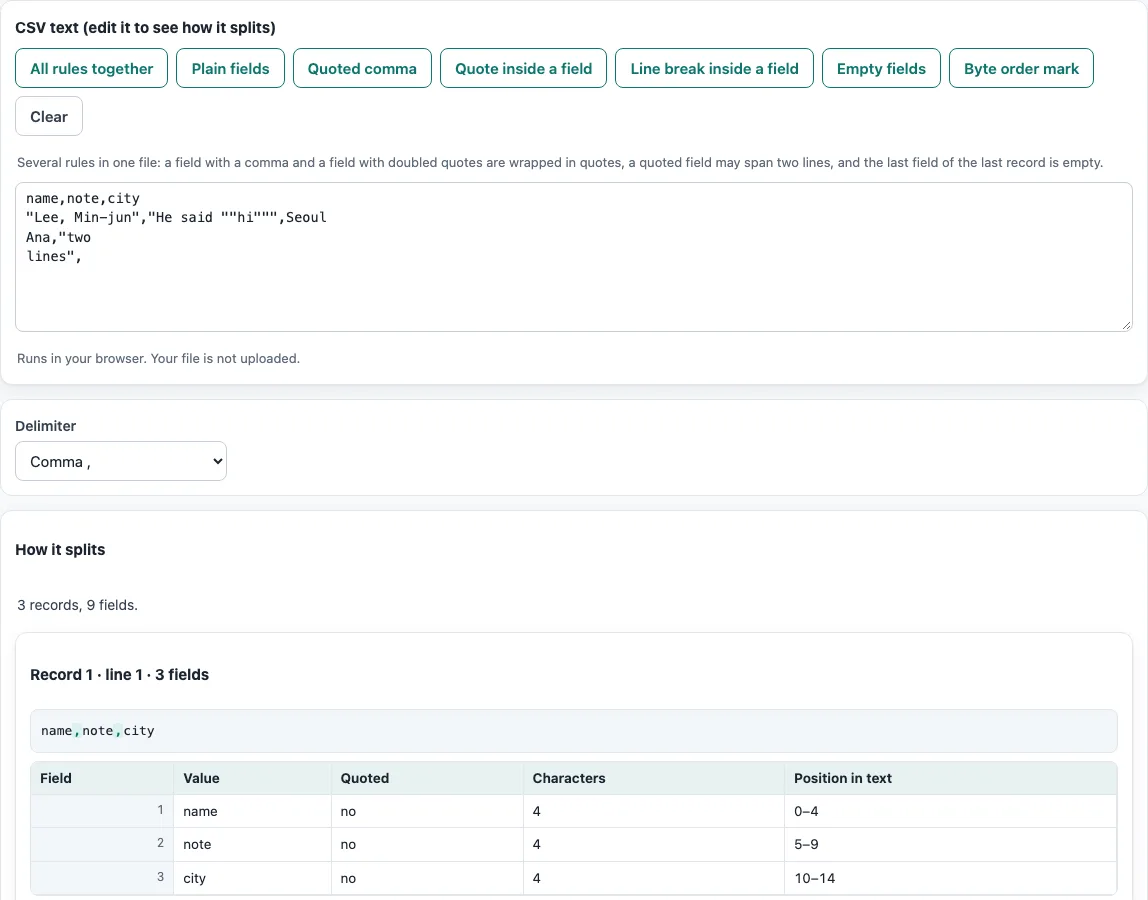
Type or paste CSV text, or pick an example, and the tool lists each record’s fields with the field number, value, whether it was quoted, its length in characters and its position in the text. It runs entirely in your web browser, so your data is processed on your device. No account or sign-up is needed. Use it to learn the format or to check your own data against the rules.
How to use the CSV field splitter
- Type or paste a few lines of CSV into the box. The result below updates as you type.
- Or press one of the Examples for each rule buttons: All rules together, Plain fields, Quoted comma, Quote inside a field, Line break inside a field, Empty fields or Byte order mark. A note under the buttons names the RFC 4180 item the example shows.
- Edit the example to test your own case: remove a closing quote, add a comma, or insert a line break inside quotes, and watch how the split changes.
- Read How it splits. Each record has its own table with the field number, the value, whether the field was quoted, its length in characters and its position in the text. Above each table, the record is shown as written in the file, with the delimiters and quote marks highlighted. A record that spans several lines shows its line range.
- Change the Delimiter menu to comma, semicolon, tab or pipe to see the same text split another way.
- Check the notes: a double quote inside an unquoted field, a quoted field that is never closed, or a blank line is pointed out with its line number.
Everything runs in your browser and nothing is sent anywhere. To check a whole file, use the CSV validator or open it in the CSV viewer.
CSV definition: what is the meaning of the CSV file format?
CSV stands for comma-separated values. To define CSV in one sentence: it is a plain-text format for tables in which each line is one record and fields are separated by commas. Because it is plain text, any text editor can open a CSV file, and most spreadsheet and database programs can import one.
A CSV file usually has the extension .csv and the MIME type text/csv. The format is not a single fixed standard in everyday use, but RFC 4180, published in 2005, describes it and is the reference most people follow. Other names for the same kind of file include comma delimited file and CSV format.
If you need to define CSV format rules for a team or a data exchange, quote RFC 4180 and state the delimiter, encoding (usually UTF-8) and whether there is a header row. Every value in a CSV file is text. There is no standard way to store data types, so a number such as 1 or a date is stored as characters until the program that opens the file decides how to read it.
What are the rules of the CSV format?
RFC 4180 sets out a short list of rules for CSV files. Each record sits on its own line and ends with CRLF, a carriage return followed by a line feed. The last record may or may not end with a line break. An optional header line may appear first, and it has the same format as the other lines.
Fields are separated by commas, and every record must have the same number of fields. Spaces are part of the field, so " Jane" and “Jane” are different values. Fields may be enclosed in double quotes. A field that contains a line break, a double quote or a comma must be enclosed in double quotes. A double quote inside a quoted field is written as two double quotes.
For example, this record has three fields:
1,"Smith, Jane","She said ""hi"""
The fields are 1, Smith, Jane, and She said “hi”. The comma inside “Smith, Jane” does not split the field because the field is quoted.
Real files do not always follow these rules. Many European programs save CSV with semicolons because the comma is their decimal separator. TSV files use tabs instead of commas. The tool shows notes for a double quote inside an unquoted field, a quoted field that is never closed, and blank lines, which are not records.
Frequently asked questions
What does a CSV file look like?
A CSV file is plain text with one record per line. A small example is:
id,name,city
1,Smith,Leeds
2,"Lee, Ana",Oslo
The first line is an optional header. The second field of the third line is quoted because it contains a comma.
What is the difference between CSV and Excel files?
A CSV file holds only the text values of one table. It cannot store formulas, formatting, multiple sheets or charts. An .xlsx file is a zipped XML workbook that can hold all of those things.
Does this tool upload my file?
No. The tool runs in your web browser, and the browser reads and processes the file on your device. Nothing is uploaded, and no account is needed.
Why does my file show a strange character at the start?
Some programs, such as Excel, write a byte-order mark (U+FEFF) at the start of ‘CSV UTF-8’ files. It is not part of RFC 4180 and is not part of the first header name; a program that does not expect it may show it as  before the first header. Press Byte order mark above to see it, or remove it with CSV to UTF-8.
Why do some CSV files use semicolons instead of commas?
Many European programs use semicolons as the field separator because the comma is their decimal separator. Open the ‘Delimiter’ menu and choose semicolon to see how the same text splits.
What does the tool’s note about a blank line mean?
A blank line is not a record, so the tool notes it separately. A quoted field that is never closed also gets a note, because RFC 4180 requires a closing double quote.
Related tools
- CSV viewer: open a CSV file and browse its rows and columns as a table.
- CSV editor: change values in CSV text when you need to fix a file.
- TSV and CSV delimiter converter: switch between tab-separated and comma-separated data.
- XLSX to CSV: turn an Excel workbook into CSV text when you only need its values.
- CSV validator: check a file for problems against the format rules.
- CSV to UTF-8: convert a CSV file’s encoding to UTF-8.
- Sample CSV files: download example files to practise with.