CSV to SQL Converter
Paste or open a CSV and get CREATE TABLE and INSERT statements for your database, with types detected and quotes escaped.
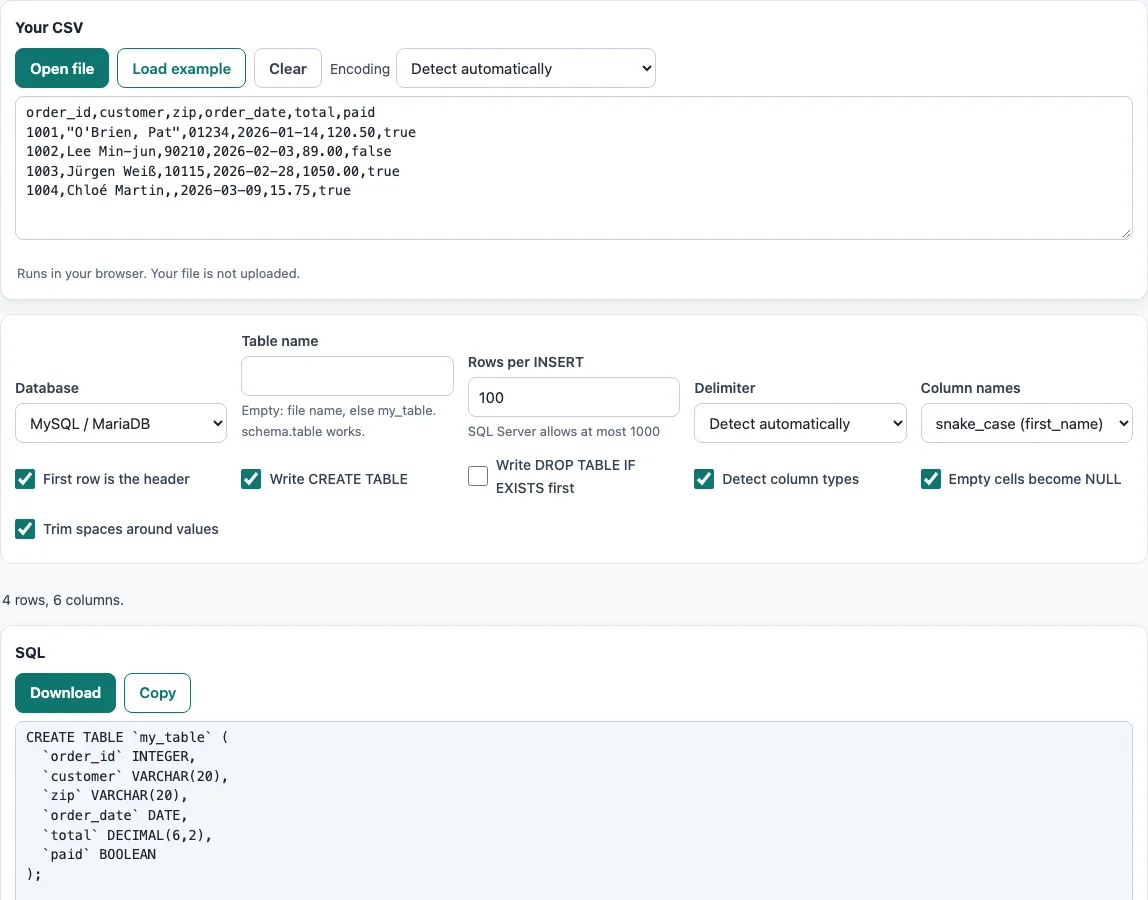
How to use the CSV to SQL converter
- Add your CSV data. Paste the text into the box, press Open file, or drop a file onto the box. To try the tool first, press Load example.
- Choose the Database: MySQL / MariaDB, PostgreSQL, SQLite or SQL Server. The identifier quoting changes to match the one you pick.
- Enter a Table name. Leave it empty to use the file name, or type a name such as
my_table. You can also writeschema.table. - Choose Column names: snake_case (
first_name, the default) or the names as they appear in your header. - Detect column types is on by default; turn it off to make every column text. Check the Columns and detected types table to see each column’s header, SQL type and number of empty cells.
- Set the output options: Write CREATE TABLE, Empty cells become NULL and Trim spaces around values are on by default; Write DROP TABLE IF EXISTS first is off.
- Set Rows per INSERT (default 100) to decide how many rows go into one statement. SQL Server allows at most 1000 rows per VALUES list.
- Read the result. It updates as you type or change an option. Press Copy to copy it, or Download to save it as a file.
If letters look garbled, change Encoding from Detect automatically. Option choices are kept in the page address; your data never is.
How do I convert CSV to SQL INSERT statements?
The tool writes INSERT statements that list each row’s values in the same order as the header. Each row becomes one tuple in parentheses, and the tuples are grouped under the INSERT … VALUES keyword. The Rows per INSERT setting controls how many tuples share one statement, so a large file produces many statements rather than one enormous line.
Numbers are written without quotes, while text and dates are wrapped in single quotes. Empty cells become NULL when Empty cells become NULL is on; otherwise they become empty strings. A row with fewer cells than the header gets NULL for the missing cells, and a row with more cells adds extra columns. The tool reports both cases so you can check them.
How do I import a CSV into MySQL, PostgreSQL, SQLite or SQL Server?
Select the matching Database option, generate the output, and run it in that database’s client. Use Write CREATE TABLE so the table is created with the output, and Write DROP TABLE IF EXISTS first if you want to replace a table that already exists. Save the result with Download and run the file, or paste the Copy output into your client.
For very large files, INSERT statements are slower than a database’s bulk loader. The loaders are MySQL LOAD DATA INFILE, PostgreSQL COPY (or \copy in psql), SQLite .import and SQL Server BULK INSERT. Use the tool’s output for smaller files or when you want to see exactly what will be written.
How are column types chosen?
When Detect column types is on, each column gets one of five types: INTEGER, DECIMAL(p,s), DATE (YYYY-MM-DD), BOOLEAN, or VARCHAR/TEXT. Detection is conservative, so when in doubt a column stays text. A value with a leading zero (such as 00123), a leading + sign, or a mix of types in the same column keeps the column as text.
In the example from the tool, the zip values 00123 and 94105 became VARCHAR(20), so the leading zero is kept. The price column became DECIMAL(4,2) and the joined column became DATE. Check the Columns and detected types table before you run the SQL, and edit the CREATE TABLE statement if you need a different type.
What about quotes in my data?
Single quotes inside text are doubled, so O'Brien becomes 'O''Brien'. This is the standard SQL way to escape a quote, and it works in all four supported databases. You do not need to change your CSV before pasting it.
Table and column names are quoted the way each database expects: name for MySQL, “name” for PostgreSQL and SQLite, and [name] for SQL Server. Quoting handles names that clash with SQL keywords or contain spaces.
Frequently asked questions
Does the CSV to SQL converter upload my file?
No. The browser reads the file and does the conversion on your device. Nothing is uploaded, and no account is needed.
Is the CSV to SQL converter free?
Yes, the tool is free. There is no sign-up step.
Can I use the SQL output in commercial work?
Yes. The output may be used for any purpose, including commercial work, and no attribution is required.
What happens if a row has fewer or more cells than the header?
A row with fewer cells gets NULL for the missing cells. A row with more cells adds extra columns. The tool reports both cases.
Why does my zip code stay as text in the SQL?
Values with a leading zero, such as 00123, stay text so the zero is not lost. The column is written as VARCHAR rather than INTEGER.
Which database should I choose if mine is not listed?
MariaDB uses the MySQL option. For other databases, PostgreSQL output is the closest to standard SQL; check the identifier quotes and the type names before you run it.
Can I load a CSV with thousands of rows?
Yes. The statements are generated in your browser and grouped by Rows per INSERT, so a long file becomes many INSERT statements of manageable size.
Related tools
- CSV viewer: Open and look through a CSV file before you convert it.
- CSV to JSON: Use this when you need JSON output instead of SQL.
- Split CSV: Break a large file into smaller parts before you generate INSERT statements.
- CSV validator: Check a file for structural problems before you convert it.
- CSV formatter: Clean up the layout of a CSV file before you convert it.
- Comma separator: Add or remove commas in your data when your values need changing.
- Sample CSV files: Download test data to practise the conversion steps.