CSV to XLSX Converter
Turn a CSV into an Excel workbook where 00123 stays 00123, long IDs keep every digit and ISO dates become real dates.
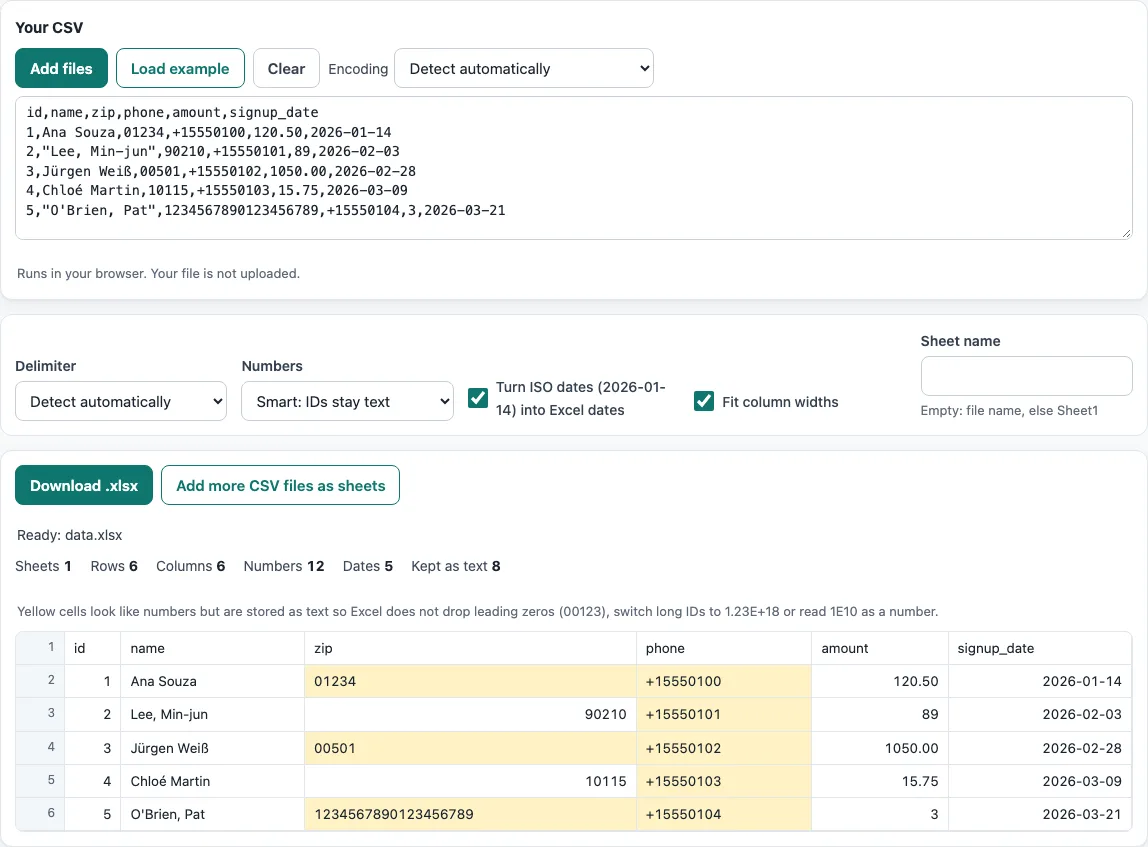
How to use the CSV to XLSX converter
- Paste your CSV text into the box, press Open file, or drop a file onto the box. To try the tool first, press Load example.
- If the text looks garbled, open the Encoding menu. It is set to Detect automatically by default. Pick another encoding only if detection gets it wrong.
- Choose a Numbers option. Smart: IDs stay text is the default. Everything as text keeps every value as text. Like Excel: all numbers converts all numbers.
- Turn ISO dates (2026-01-14) into Excel dates and Fit column widths are on by default; turn them off if you do not want them. Type a name in Sheet name, or leave it empty to use the file name.
- Check the preview. Yellow cells are values that look like numbers but are kept as text. Read the summary for sheets, rows, columns, numbers, dates and values kept as text.
- If you have more files, use Add more CSV files as sheets to build one workbook with one sheet per file.
- Press Download .xlsx. The SheetJS library loads at this point.
The result updates as you type or change an option. Your option choices are kept in the page address, so a bookmarked or shared link reopens the tool with the same settings. Your data itself is never put in the address. Press Clear to empty the box.
What is the difference between CSV and XLSX?
CSV is plain text that holds one table. Values are separated by commas and rows are separated by line breaks. XLSX is an Excel workbook: a zipped package of XML files that can hold several sheets, number formats, formulas and styling. When you convert from CSV to XLSX, the file gains structure and a place for formatting, but the values themselves stay the same.
That difference matters most for numbers. A CSV has no cell types, so every value is just characters until a program decides what it means. Excel makes that decision for you, and opening a CSV directly in Excel drops leading zeros, so 00123 becomes 123. An XLSX file stores each cell with its own type, which is why this tool can write 00123 as text and 120.5 as a number.
Why does Excel change long numbers to 1.23E+15?
Excel stores numbers with 15 significant digits. A longer number cannot be stored exactly, so the extra digits are lost, and the value may show in scientific notation such as 1.23E+18. Card numbers, account numbers and long IDs are the usual cases.
Writing these values as text cells avoids the problem, because text is stored exactly as it is typed. In the default Smart: IDs stay text mode, any value with more than 15 significant digits stays text. The same mode also keeps values with a leading zero (00123), a leading plus (+15550100) and an exponent (1E10) as text. Ordinary numbers such as 120.5 remain numbers, so you can still add them up.
In a checked example, 01234 and +15550100 were written as text, 120.5 was written as a number, and 2026-01-14 was written as a date. Reading the file back gave the same CSV.
Excel sheets have limits: 1,048,576 rows and 16,384 columns per sheet, and up to 32,767 characters per cell. The tool respects these limits and reports them in the summary, so you can see when a file is too large for one sheet.
Frequently asked questions
How do I convert CSV to XLSX without losing leading zeros?
Keep the Numbers option on Smart: IDs stay text, which is the default. Values such as 00123 are written as text, so the zeros stay. Check the preview to confirm the values you need.
Can I put several CSV files into one workbook?
Yes. Press Add more CSV files as sheets, and the tool builds one workbook with one sheet per CSV file. Each sheet is named after its file, or you can set a name with Sheet name.
Why are dates real Excel dates in the workbook?
With Turn ISO dates (2026-01-14) into Excel dates on, a value written as YYYY-MM-DD becomes a date cell, so Excel can sort it, filter it and use it in formulas. Other date styles, such as 14/01/2026, stay text because they could mean two different days.
Can I change the delimiter?
Yes. The Delimiter menu detects comma, semicolon, tab or pipe automatically, and you can choose one yourself if the preview shows everything in one column.
Can I convert CSV to XLS, the older Excel format?
No. The tool writes .xlsx files only. Most current spreadsheet programs open .xlsx, so you can use that format for sharing.
Is my file uploaded when I convert CSV to XLSX?
No. The tool runs in your browser, reads the file there, and processes it on your device. Nothing is uploaded, and no account is needed.
Related tools
- CSV viewer: open and look through CSV data before you convert it.
- CSV converter: change CSV data into other formats.
- XLSX to CSV: go the other way and turn an Excel workbook back into CSV.
- Merge CSV files: join several CSV files into one before converting.
- Split CSV: divide a large CSV file into smaller parts.
- CSV validator: check that a CSV file is well formed before you convert it.
- CSV to UTF-8: re-encode a CSV file as UTF-8 when characters look wrong.