JSONL to CSV Converter
Paste JSON Lines or open a .jsonl file: each line becomes a CSV row, and broken lines are listed by number instead of stopping you.
JSONL to CSV is a free browser tool that converts JSON Lines, also called NDJSON, into a CSV file with one row for each line. You can paste your data into the box, open a file, or drop a file onto the box, and the CSV result appears as you type. Each line becomes one row, and the columns are built from the keys found across all lines.
The tool runs entirely in your web browser. Your file is processed on your own device and is never uploaded, and no account or sign-up is needed.
It also works in the other direction. You can switch the direction to convert CSV rows into JSON Lines, with one JSON object per row.
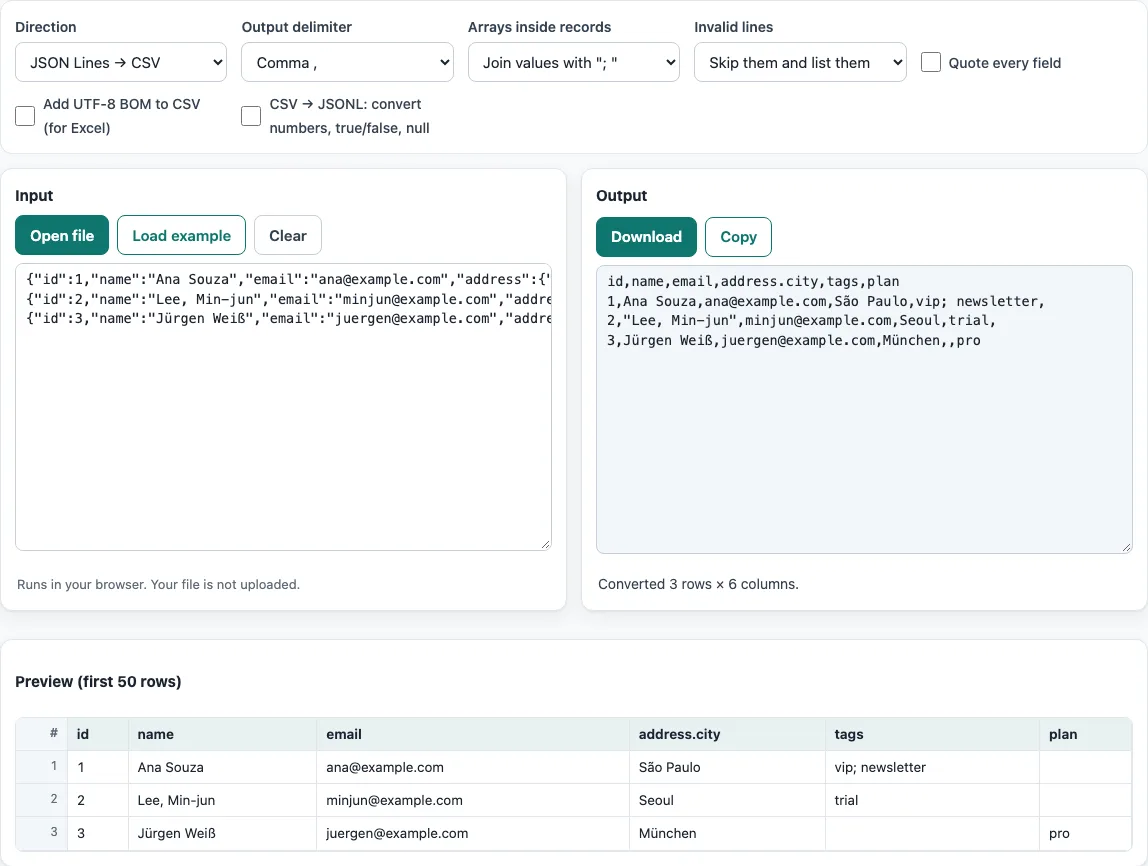
How to use the JSONL to CSV tool
- Paste your JSON Lines text into the box, press Open file, or drop a file on the box. To try the tool first, press Load example. Press Clear to empty the box.
- If the file does not display correctly, open the Encoding menu. It is set to Detect automatically by default, so change it only if the text looks wrong.
- Set Direction to convert JSON Lines to CSV. The other choice, CSV → JSON Lines, reverses the conversion.
- Under Invalid lines, keep Skip them and list them to skip broken lines and see each one with its line and column number. Choose Stop and report the first one if you want the conversion to halt at the first error.
- Under Arrays inside records, choose how list values are written: join them with
;, keep them as JSON text, or give each item its own column. - Adjust Output delimiter, Quote every field, or Add UTF-8 BOM to CSV (for Excel) if your target program needs them.
- Check the preview of the first 50 rows. Then press Copy to copy the result, or Download to save it as a file.
The result updates as you change any option. Your option choices are kept in the page address, so a bookmarked or shared link reopens the tool with the same settings. Your data itself is never placed in the address.
What is a JSONL file?
A JSONL file is a plain text file in which each line holds one complete JSON value, usually a single object. JSONL stands for JSON Lines, and the same format is often called NDJSON (newline-delimited JSON). The format is common in logs, data exports, and machine-learning datasets.
Because every line is self-contained, a program can read a JSONL file one line at a time without loading the whole file into memory. It can also append a new record by adding one more line at the end. This is why the format suits large or growing datasets.
What is the difference between JSON and JSON Lines?
A regular JSON file usually holds one value, often an array of objects wrapped in square brackets and separated by commas across the file. A parser must read the whole structure before it can work with the data.
JSON Lines drops the outer brackets and commas. Each line is a complete JSON value on its own, so the file is a sequence of separate records rather than one large structure. A regular JSON array file is not JSON Lines, so use the JSON to CSV tool for that kind of file.
When the tool reads your input, it treats each non-blank line as one record. Each record becomes one CSV row, and blank lines are skipped.
Converting the other way works the same in reverse. With Direction set to CSV → JSON Lines, each CSV row becomes one JSON object on its own line, using the header names as keys. Values stay strings unless you turn on number conversion, so IDs such as 007 keep their zeros.
Large files work line by line in the same way; only your device’s memory sets the limit.
A line that holds an array or a single value instead of an object goes into one column named value; with the default setting an array such as [1,2] is written as 1; 2.
Frequently asked questions
What happens to a broken line?
By default, the tool skips a line it cannot read and lists it with its line number and the column where the error occurred. For example, if the third line is the text not json, it is reported as invalid on line 3, column 1. The other lines still convert. If you select Stop and report the first one, the conversion halts at the first broken line instead.
Can I convert CSV to JSONL?
Yes. Set Direction to CSV → JSON Lines, and the tool writes one JSON object per CSV row. Values stay as text by default. Turn on CSV → JSONL: convert numbers, true/false, null if you want numbers, true/false, and null values converted to their JSON types.
Why do some cells in my CSV come out empty?
The columns are the union of all keys from all lines, in the order they first appear. If a line does not have a key, its cell in that column is left empty. For example, {"id":1,"ok":true} and {"id":2,"note":"x"} produce the header id,ok,note, with rows 1,true, and 2,,x.
What happens to nested objects?
Nested objects become dotted column names. An object such as "address": {"city": "Leeds"} becomes a column named address.city.
Will the CSV open correctly in Excel?
Turn on Add UTF-8 BOM to CSV (for Excel) if your file contains accented letters or non-Latin text and Excel shows them incorrectly. The byte-order mark tells Excel to read the file as UTF-8.
Is my data sent anywhere?
No. The browser reads and processes the file on your device. Nothing is uploaded, and you do not need an account.
Related tools
- CSV viewer - Open a CSV file and inspect its rows and columns before or after converting it.
- CSV to JSON - Use this when you want to turn a CSV file into JSON rather than JSON Lines.
- JSON to CSV - Use this for a regular JSON array file, which is not JSON Lines.
- CSV to XLSX - Use this when you need an Excel workbook instead of a plain CSV file.
- Split CSV - Use this to divide a large CSV file into smaller parts.
- CSV validator - Use this to check a CSV file for formatting problems.